• Welcome to Bare Knuckle Pickups Forum.
 

Anyone know how to use cubase?

Started by Catalyst77, February 18, 2009, 09:23:00 AM

Previous topic - Next topic

Catalyst77

Ive had this program for what must be nearly 10 years but i still cant use it properly!

I usually start by laying down a click track or a simple drum loop.  The problem i have is that every time i record a new track, i also re-record the track i'm playing along to.  It means if i record 4 tracks the forth track has all the previous tracks as well!

Obviously this makes it impossible to mix, and the sound quality ends up being pretty naff; plus you can't edit out mistakes :(

I'm sure this is a school boy error, but any help would be greatly appreciated!

Cheers

Ben
HUM: RR, M, SM, VH2, EM, BD,CS, CR, HD, NB, WP, RY, SINGLE :IT, SH, p90: MQ

sgmypod

In cubase it list the track you ope IE audio 01. just underneath is two symbols a circle with a dot(this on all you tracks will be red) and a speaker.

The track you want to record leave the circle symbol red, click the ones you don't want to record on until they are not lit red
Autotune My Arse

Crawler,nailbomb & Ltd Ed Emeralds, apache, now riff raff..EX- N/bomb, IT, Mquee

Johnny Mac

Could be the above. ^

It could be in the basic set up of the software, routing the audio signal. Its a complex program so there could be a few things to trouble shoot. Do you get echos?

I bought a manual from amazon and gave myself a head ache trying to learn it. But once you get going things fall in to place quickly. I don't use its full potential though as I don't feel i need to, yet.
Warpig, MQ,
Miracle Man-Trilogy Suite, Cold Sweats, Black Guards, Rebel Yells & Irish Tours!

psy

It can do this if you've got the wrong input selected on the windows sound controls (if you're running Windows that is).  To check double click the speaker icon next to the little clock at the bottom right of your screen.  That'll bring up a bunch of sliders for playback volume control.   Next go to the options menu & select properties.  Then select recording.  You'll now be able to change the recording input.  If you're currently getting previous tracks re-recorded every time it'll be on something like 'what you hear' (or words to that effect).  There should be a line-in option.  Hopefully that will sort you out.  :)
Cold Sweat set in Mockingbird NJ Classic > Boss GT6 > Sansamp PSA > VHT 2/90/2 > Zilla 2x12 cab > =D

Denim n Leather

You have more than one track record-enabled. sgmypod has it right -- make sure that the red circle is lit only on the track you wish to record on!!


Cubase has a very good manual in PDF format under the "Help" menu; there are also many guide books for Cubase. I have the "Fast Guide" to Cubase 4; I recommend it.


Catalyst77

Cheers guys

I will try all of the above!
HUM: RR, M, SM, VH2, EM, BD,CS, CR, HD, NB, WP, RY, SINGLE :IT, SH, p90: MQ

Catalyst77

Hi

Ive checked out the program its actually cubasis vst5.

I can't seem to find the red dots etc here's a screen dump of what i'm seeing.


THANKS :D

Ben
HUM: RR, M, SM, VH2, EM, BD,CS, CR, HD, NB, WP, RY, SINGLE :IT, SH, p90: MQ

MDV

Old school

Never used VST, but do those tracks expand out?
[URL=[url="http://www.facebook.com/pages/MDV-Productions/207971855966796%5DMDV"]http://www.facebook.com/pages/MDV-Productions/207971855966796]MDV[/url] Productions[/URL]

Denim n Leather

Wow, I don't even know what half of that stuff MEANS!

Time for an update!!

phlip

#10
In that Cubasis the 'red dot' is the enable button beside mono in the track properties.
What's your sound card? It may be mixing your input with your output buss on it's internal mixer hence you're always recording 'whats you hear' as opposed to just the input.
Also If I recall correctly int1L is the left mono input on your sound card.

Catalyst77

Thanks for your help

Unfortunately im now even more confused. :(

I tried the help function, which was helpful but didn't address the issue at all.

I then tried the enable button, but rather than being seletable per track it is either selectable for all or none, i.e. it wont isolate any individual track.

here's a screen shot of what im looking at when i click the speaker sign in the bottom right of my comp.
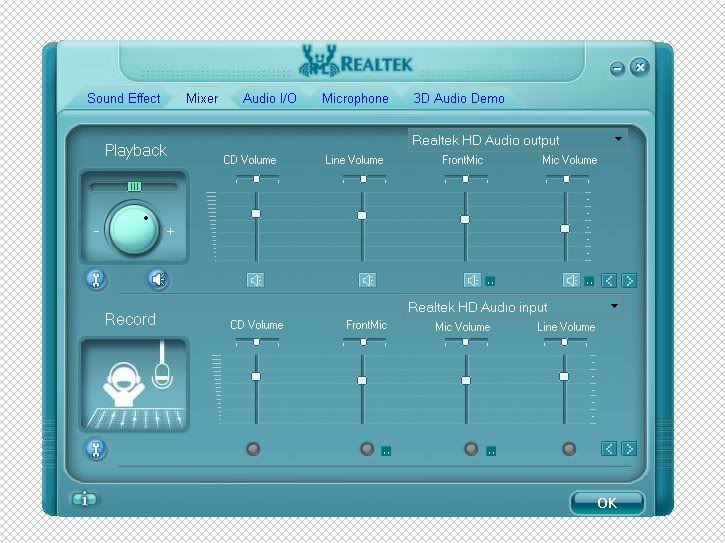


One thing i forgot to mention, if i were to record the click on track one, then guitar on track two, the click recorded on track two would not be in time with that of track one, there's a slight delay.

HUM: RR, M, SM, VH2, EM, BD,CS, CR, HD, NB, WP, RY, SINGLE :IT, SH, p90: MQ

Johnny Mac

That's VST, the one I'm using. It is an old version but it still does the job and works for me. I think you have a signal routing problem. Do you have a soundcard that is better than a standard pc one?
Warpig, MQ,
Miracle Man-Trilogy Suite, Cold Sweats, Black Guards, Rebel Yells & Irish Tours!

Catalyst77

Yay!

Finally figured it out! :lol:

Not sure exactly what i did but in the recording control panel you have to select between

CD VOLUME
FRONT MIC
MIC VOLUME
LINE VOLUME
STEREO MIX

Not sure what it was on before, but now ive set it to line volume the problem is solved!
HUM: RR, M, SM, VH2, EM, BD,CS, CR, HD, NB, WP, RY, SINGLE :IT, SH, p90: MQ

Johnny Mac

Trumpet Fanfare!!  :D :D :D

So 10 years eh  :lol: oh well i hope you have fun with it. If you get stuck again drop me a line, its still capable of making good recordings even though its an old version.
Warpig, MQ,
Miracle Man-Trilogy Suite, Cold Sweats, Black Guards, Rebel Yells & Irish Tours!